Dmailer Backup — NOW FREE!

Posted by: pctutorials  :  Category: Top Software

Your Favourite Backup Software is now FREE!

See the VIDEO below!

Free Backup Sftware

Dmailer Backup V3.0, a backup utility that integrates both local and remote backup mediums, is Dmailer’s latest software release. Not only have Dmailer released a fantastic software package, but this time, they have done it for free! Chances are you have essential files on your PC such as documents, MP3’s, pictures, projects and other important things. It is therefore crucial that you have a backup. To make such a task easy, Dmailer Backup V3.0 includes an automatic backup wizard, sleek GUI, Cross Platform Support, Versioning, Password protection and Encryption and Dmailer Online Backup integration for free! Outlined below are some of the exciting features of Dmailer Backup V3.0.

Automatic Backup Wizard

No one likes to manually go around searching for individual files to backup. Thanks to Dmailer Backup’s Automatic Backup Wizard, it is possible to hit one button to select your important files located within your profile including My Documents, Music, Photos, Videos and Desktop folders and back them up instantly.

Cross Platform Support

Dmailer Backup V3.0 allows you to backup and restore files flawlessly between Windows and Mac computers. There is no longer a impediment between compatibility anymore. While you could argue that most people use Windows, there are instances where you need to use the other operating system, whether it be at home or work. Therefore, Dmailer Backup V3.0 will work across both systems.

Versioning

Versioning is the process of restoring a file back to a specific time; very useful for documents. Dmailer Backup saves multiple versions of a file so that if you need to go back to a certain date, it is as easy as using a few mouse clicks! It is good for files that are updated regularly since sometimes you need to go back a few days and find specific data.

Encryption

One of the most important things in creating a backup on any medium is security. Thanks to Dmailer’s use of AES 128 bit encryption and password protection, you can rest assured that your data is safe and can only be accessed by you. Dmailer Online also uses security measures so that your files are safe on their fortified servers.

Dmailer Online Backup Integration

Dmailer Online is a service provided by Dmailer that allows you to backup your files online instead of using an external backup medium. By integrating this service with Dmailer Backup, it means you have the flexibility to store file on an external device, online or both. All you need is an internet connection and you are set to backup online.

Conclusion

Dmailer Backup V3.0 presents itself as a useful backup utility for the casual and power user. Dmailer Backup has a huge advantage over a lot of other commercial backup utilities since it combines both local and remote backup mediums; other competitors use only one type.

It is necessary to have a backup strategy of some sort since disaster can strike at any time. Dmailer have now provided the solution for free so there is no excuse not to have a backup. Download your free copy of Dmailer Backup V3.0 today!

http://www.dmailer.com

WATCH THE VIDEO!

If you enjoyed this post, make sure you subscribe to my RSS feed!

How to Backup your Data with Dmailer Online

Posted by: John  :  Category: Top Software, YouTube

Dmailer Online, a subscription based online storage system for both Dmailer Sync and Dmailer Backup, is a great way to backup your data. I am not going to discuss its features in this article, but rather how to backup your data using Dmailer Online. To learn about Dmailer Online’s great features and solutions, check out the Dmailer Online Review .

For this tutorial, I’m going to show you how to use Dmailer Online with Dmailer Sync.

1. Firstly, you must create a Dmailer Online account. Open Dmailer Sync and on the left hand side, select create Online Account. Enter the correct credentials and click OK.
2. Once your account is created, you will be asked which files you would like to backup. Select the corresponding files and check the “Start Online Backup Automatically” box.
3. The backup process will initiate and once completed, click ok to close the progress dialogue.
4. To verify your files have been uploaded, on the left hand side panel, select access online account. If you are required to enter login details, do so.
5. Once you have logged in, you can navigate through your files by clicking on the browse tab then selecting the folder which has your files.
6. Should you wish to upload more files, click Online Backup Settings on the left hand side panel and tick the folder/s you would like to upload. Make sure you select correct filters and click ok.

There should be no excuse for not having a backup of the current files you have on your computer as I have just outlined how easy it is to synchronies your files online. Remember, the online account you have created it limited to 30 days so if you wish to keep accessing your files online, you can upgrade to a 3GB for $5.99 per year. If you need more space, you can choose the 30GB account for $34.99 per year or an unlimited space account for $69.99 per year. Remember, your Dmailer Online account can be used for both Dmailer Sync and Dmailer Backup which means it represents great value for money.

If you enjoyed this post, make sure you subscribe to my RSS feed!

Dmailer Online Review

Posted by: pctutorials  :  Category: Top Software
Dmailer Online, Online data backup software. Store your data on a remote storage server with high security.

Dmailer Online is an online storage backup tool for use with both Dmailer Sync and Dmailer Backup. Rather than using a USB stick or external storage device to backup/sync your data, you can use the Dmailer Online service to backup your data to a safe, remote server. Where ever there is an internet connection, you can access your data instantly! Doesn’t matter if you use a Mac or PC, Dmailer Online is for everyone. Read on to find out what features are included.

Remote Server Backup

Need to access your files instantly? Dmailer Online allows you to retrieve your data at anytime, anywhere with an internet connection for your convenience. Having remote a backup solves the problem of misplaced external storage devices because you can access your data with a mere username and password.

Share Files and Folders

We all like to send and share photos and videos around. While social networks are good for such things, you might have noticed that the quality is greatly reduced to cut costs. Dmailer Online keeps photos and videos intact like the originals, allowing you and your friends to enjoy your photos and videos. And don’t worry about file access, you can set which folders and files specifically you want to share and for how long.

100% Secure with AES 128 bit Security

A common brought up subject with the internet is security and rightly so. Dmailer have solved the security problem by using AES 128 bit security, along with a username and password protection scheme. To keep security tight, Dmailer Online requires no installation, leaving zero trace behind.

Cross Platform Support

Dmailer Online allows you to flawlessly backup and restore data on both Windows and Mac computers, destroying the hurdle between compatibility issues. It’s almost impossible to avoid two different operating systems since sometimes in the work place you are required to use a Mac and a PC at home or vice versa.

Double Backup

If by the off-chance you delete the backup from your external device, using Dmailer Online allows you to restore the file with a few simple clicks! There is no such thing as to many backups; better to be safe than sorry.

Summary

Dmailer Online is great companion for both Dmailer Sync and Dmailer Backup. Having the hybrid capability of backing up locally and remotely gives you the best of both worlds and better because essentially you have two backups. Dmailer Online is for everyone who uses Dmailer Backup and Dmailer Sync, while not mandatory; it does present a huge advantage. For Dmailer to provide such a great service, it does cost, but it is worth it. Prices are as follows (per a year): 3GB $5.99, 30GB $34.99, Unlimited $69.99. Absolutely priceless if this service saves you from loosing an exam paper, business model, email list, or any important files you may have; you need to have a backup.

Dmailer Online provide a great backup service for a small price that can be used anywhere around the world to save you headaches. Dmailer are offering a 30 day/3GB trail for everyone to use. Head to Dmailer to evaluate this great software yourself; you won’t be disappointed.

If you enjoyed this post, make sure you subscribe to my RSS feed!

Dmailer Backup Review

Posted by: pctutorials  :  Category: Top Software

Dmailer Backup Review

Dmailer Pc Backup Software Screen Shot.

Dmailer Pc Backup Software Screen Shot.

Dmailer Backup, from the creators of Dmailer Sync, is a mobile backup client loaded with features to solve all your backup needs. If you have important files on your PC, whether it be music, word documents, spread sheets or anything else you may have, it is essential that you make a backup. Once configured, Dmailer backup is an automatic, easy to use and powerful backup client that can be used on a PC or Mac. Read on to find out what features Dmailer Backup incorporates.

Cross Platform Support

Dmailer Backup allows you to seamlessly backup and restore data on both Windows and Mac computers, breaking the barrier between compatibility issues. It’s almost impossible to avoid two different operating systems since sometimes in the work place you are required to use a Mac and a PC at home or vice versa.

Automatic Backup

Most of us do not like spending time working out what to backup and actually executing the task. Dmailer Backup solves this problem by automatically, once configured, to back up files and folders you have selected once the backup device is plugged in.

Versioning

Sometimes you need to restore a file back to a certain date, preserving all its previous information. Dmailer Backup allows you to keep multiple versions of any selected file so that you can go back in time and restore it. Very handy for word documents, spreadsheets or volatile files since they are updated often.

Customizable Data Backups

Thanks to the versatility of Dmailer Backup, it is possible to set filters so that you can choose to backup a particular file type such as videos, mp3, word documents, PDFs and spreadsheets, certain file size, or even a defined time frame. That way you don’t waste space when selecting a complete folder when you only really need to select important files to backup.

Password protection and Encryption

In the possible instance that you loose your external backup device or worse, have it stolen, you can be rest assured your data is in fact safe. The only way to access your backed up files is via using your username and password. And don’t worry about anyone trying to break into it either, since everything is encrypted with AES 128 bit encryption.

Summary

Dmailer Backup is an easy to use piece of software yet very customizable for the advanced user. Anyone who has a computer, whether it be a Mac or PC, must have some sort of a backup plan. I honestly think Dmailer Backup should be in that plan, since anyone can use it. For those concerned about Dmailer’s Backup features, it contains a lot and is competitively priced too. So, if you are beginner or a power user, Dmailer backup provides the end user with a well priced, professional backup tool that should not be overlooked. Dmailer are happy enough to let you have a try of their great software, Dmailer Backup. If you are not backing up your data, now would be good time to start.

www.dmailer.com

If you enjoyed this post, make sure you subscribe to my RSS feed!

Dmailer Sync Review

Posted by: pctutorials  :  Category: Top Software

Dmailer Sync Review

dmailer

Dmailer Sync, created by Dmailer, allows you to synchronize your personal files and data such as music, photos, emails, bookmarks and any other files. You can even synchronize your desktop wallpaper, all of which is stored on your choice of portable media such as a USB stick, portable hard disk or whatever you choose. If you are constantly updating files and data manually to a portable device, you will be happy to know that this software, by Dmailer, can do all of that for you in an instant.

Dmailer Sync consists of the following useful applications: Email Synchronization, Mobile Email Client, Data Synchronization, Encryption Software, and Favorites Synchronization.


Email Synchronization and Mobile Email Client

If you need to check your emails at home, work, on the road, or even at a restaurant, Dmailer gives you that freedom wherever there is a PC. Dmailer Sync can synchronize emails from, Outlook, Outlook Express and Windows Mail. What is great about this feature is that you are not required to have an email client on the PC you are using; Dmailer Sync provides you with a built-in one. If you are required to send, receive/check emails often, this feature will come in very handy.

Data Synchronization
You have been working on some files at work and need to complete them at home. Data Synchronization synchronizes the work you had previously been working on to your portable media device and then updates its back at home. This feature is not just limited to documentation work, it can be music files, photos, videos, PDF’s, or any other files you may have.

Encryption Software
Worried that someone might steal your files? Thanks to AES 128-bit encryption, the only person who can access your files is you since all the data is password protected. Should you loose your portable device by misfortune, Dmailer Sync has the option of entering your contact details into an accessible form for all to see. This allows the person who finds your device to return it to you with ease.

Favorites Synchronization Software
Have a list of website that you like to visit? I do, and because Dmailer Sync can synchronize both FireFox Bookmarks and Internet Explorer Favorites, you can go anywhere and access your saved sites. Another nifty feature is the secure browsing feature. What this means is once you have finished an internet browsing session, no evidence of your browsing is left behind. Not even in the temp files.

Summary
Dmailer Sync is feature packed yet is of an extremely small footprint in size. It is addressed to people who use more than one computer frequently. This would include students, business people, journalists, and just about anyone who uses a computer at work. Considering the amount of features Dmailer Sync contains, it represents exceptional value for money for those who need to keep their data up-to-date with more than one computer. If you have not already, you can try out this brilliant software by visiting Dmailer today.

If you enjoyed this post, make sure you subscribe to my RSS feed!

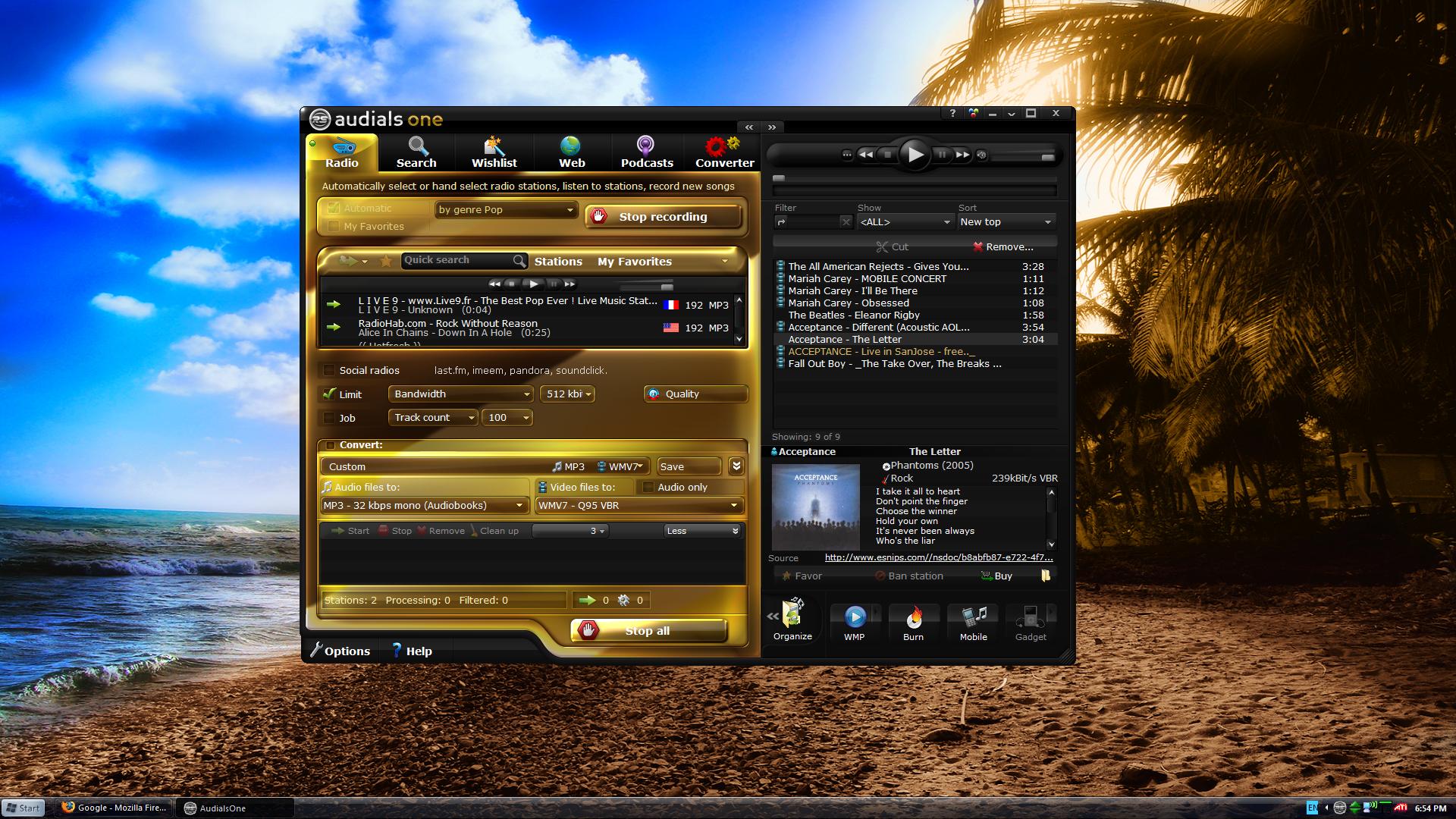
AudialsOne 4 – Videos, Radio, Convertor and More

Posted by: pctutorials  :  Category: Top Software

audialsone-4-review

Audials One, by RapidSolution Software is perhaps one of the most featured pack media centers of all time. Audials One can grab multiple radio stations at once, watch and convert videos, create ringtones, burn CD’s and much more.

When I was first introduced to the software, I wasn’t quite sure of its functionality. Having played around with it, the incorporated features are endless. I’ll split the features into 6 sections based on the tabs in the software: Radio, Search, Wishlist, Web, Podcasts, and Converter.

Radio
The radio section allows you to select multiple radio stations based on your choice of genre or wishlist (more about this later on) , record them, and split the songs into whatever format you want. Remember, all of this is done automatically for you. There’s thousands of radio stations to choose from, so you’re guaranteed to find something you like.

Search
The Search function allows you to search the internet for videos and mp3’s. Not only can you use a title search to find music, but also based on genre and similar artists in your current music library. Once the MP3 has been downloaded, it can be converted if desired, the MP3 is tagged, Album Art is added, and lyrics are grabbed as well. Nice.

Wishlist
The Wishlist allows you to add artists to a list in which Audials One will crawl the net looking for songs and videos related to that artist. There is also the option to share wishlists with other people. Basically, it’s audio on demand.

Web
So you have been on the net watching some videos, saw a video you really like and want to save it. AudialsOne monitors you internet temp folder and gives you a list of all the videos you have previously viewed. Once again, you have the option of converting the video to a selected video format if you wish.

Podcasts
Subscribed to multiple Podcasts? Audials One will download multiple Podcasts in parallel to make the most of your internet connection. There are many Podcasts to search through from all over the globe, so make sure you take a browse.

Converter
Converter allows you to convert any multimedia file on your PC to your selected format. Ranges from WMA, Ogg, FLAC to MP4, 3GP,XVID and many more. Also, Converter can strip your DRM protected audio files to give you freedom.

Additional Features
Audials One allows you to burn your multimedia files to CD, with the choice of a standard audio CD or Data disc. Using the audio files in the library, you can make your own ringtones, allowing you to customize each ringtone as much as you like. You can also synchronize your selected songs to your MP3 player.

Summary
Audials One contains a huge amount of features which have been packaged very well into a easy-to-use interface. It’s suited to a wide audience of people, but mostly those who want to download music and videos. Those who want to free their music from DRM will be in on this too. Audials One represents excellent value for money for people whom love audio and videos. Grab your copy of AudialsOne today.

If you enjoyed this post, make sure you subscribe to my RSS feed!
TeraCopy – Copy files faster and safer

Posted by: pctutorials  :  Category: Top Software

teracopy
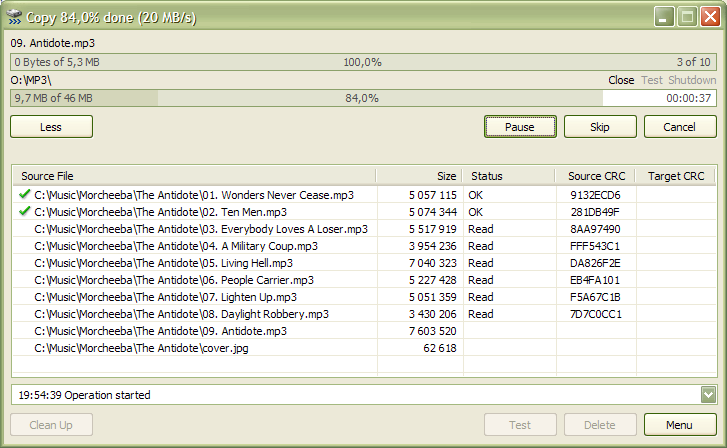
Whether you are a PC enthusiast or not, chances are you have had to transfer files to either a USB stick, another hard disk or even another computer. Generally speaking, Windows “does the job”, but that’s it. Especially when you’re transferring large files, a small hiccup can cause the transfer to halt.

Thanks to the folks at Code Sector, they have invented a piece of software that integrates into the Windows shell and that will transfer files faster and safer: TeraCopy. What I mean by safer is that you can pause the transfer at anytime you like, then resume at a later time.

You know, I think Code Sector should contact Microsoft and ask them if they can integrate their software into Windows 7. Seriously, everyone should own a copy of TeraCopy.

If you enjoyed this post, make sure you subscribe to my RSS feed!
Download Nero 9 for free!

Posted by: pctutorials  :  Category: Freebies, Top Software

free-nero

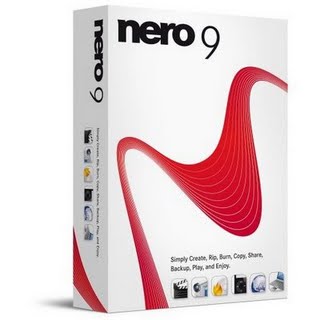
Perhaps the most well known burning tool known to man, Nero have released their little gem for free: Nero 9. Nero 9 Free version maybe limited compared to the premium version, however if you just want to copy a disc, the free version will burn both CDs and DVD’s without a hitch. You can download Nero 9 Free version from here. Enjoy.

If you enjoyed this post, make sure you subscribe to my RSS feed!